JHA hard hat gear icon-1  RAMS

    Prepare for high-risk work with RAMS management

    Streamline Risk Assessment Method Statement reviews, approvals, and tracking to manage leading safety indicators and keep teams prepared before work begins.

    Trusted by Construction's Best

    Elliott Group logo in grayscale - a client of HammerTech, using construction safety intelligence platform on jobsites throughout the UK
    Logo of Boston Scientific construction company, a user of HammerTech's all-in-on HSEQ platform
    Elliott Group logo in grayscale - a client of HammerTech, using construction safety intelligence platform on jobsites throughout the UK
    Logo of MJ Conroy Construction - a client and user of HammerTech's construction safety platform.
    Logo of DPR Construction, a user of HammerTech's HSEQ software services
    Flynn Construction company - a user of HammerTech's construction safety intelligence software for safer construction sites.
    A logo of John Paul Construction, a HammerTech client using our HSEQ software.
    Conack construction company logo - a user of HammerTech's construction safety intelligence software for safer sites.
    Monami Construction Logo - a user of HammerTech's construction safety intelligence software for safer sites.
    Vision Contracting logo - a user of HammerTech's construction safety intelligence platform for safer sites.
    Townmore Construction's logo, a HammerTech HSEQ software client.
    Designer Group construction company, a user of HammerTech HSEQ safety intelligence platform.

    Proactive RAMS Management

    Centrally manage RAMS in one place 

    Create, review, and reference RAMS across projects from a single system.

    • High-Risk Tags – Flag RAMS as high risk to prioritize reviews and increase oversight.

    • Digital Entry – Create and submit RAMS from desktop or mobile devices.

    • Easy Reference – Access RAMS anytime during construction and link them to related safety processes.
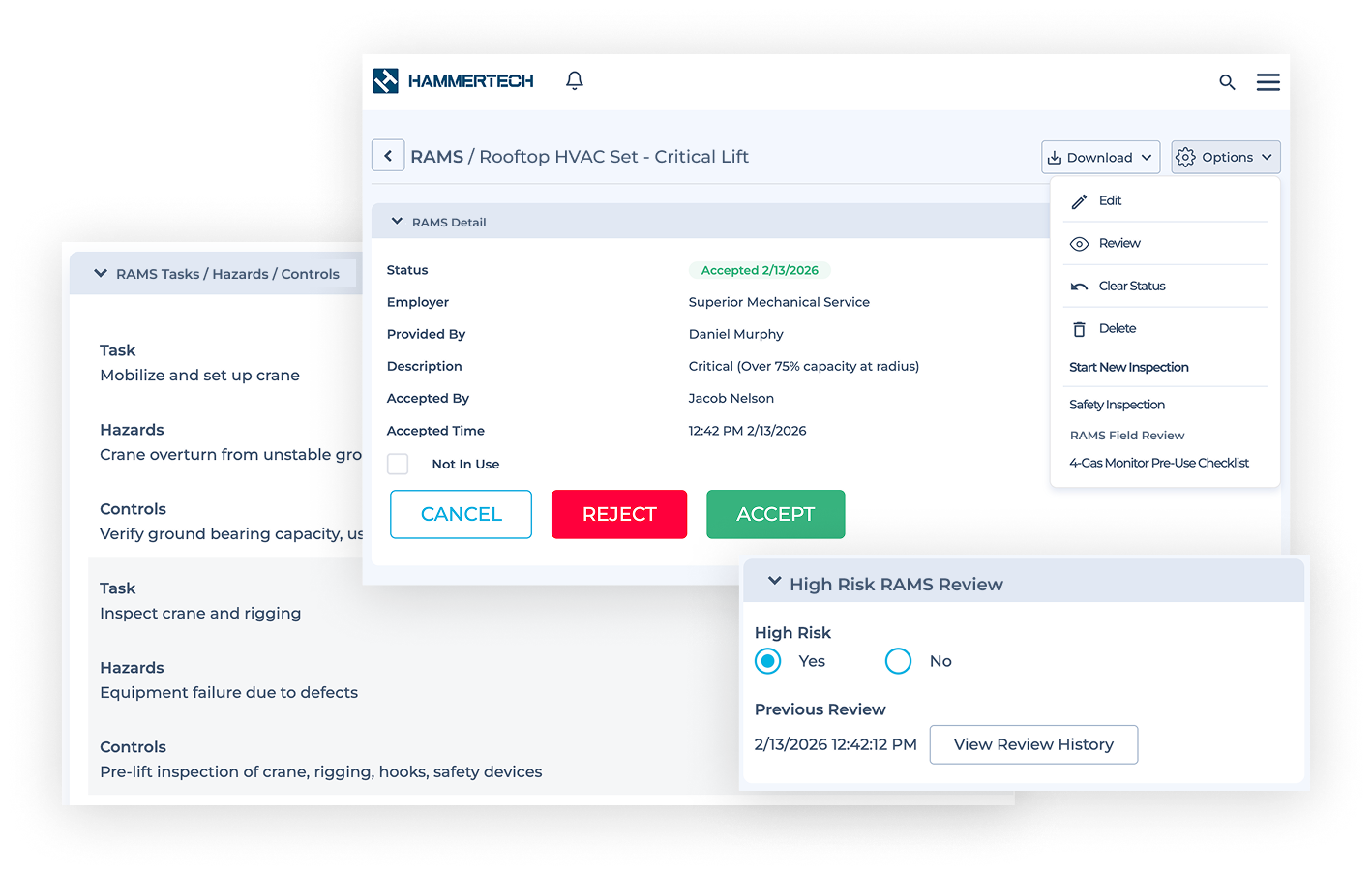
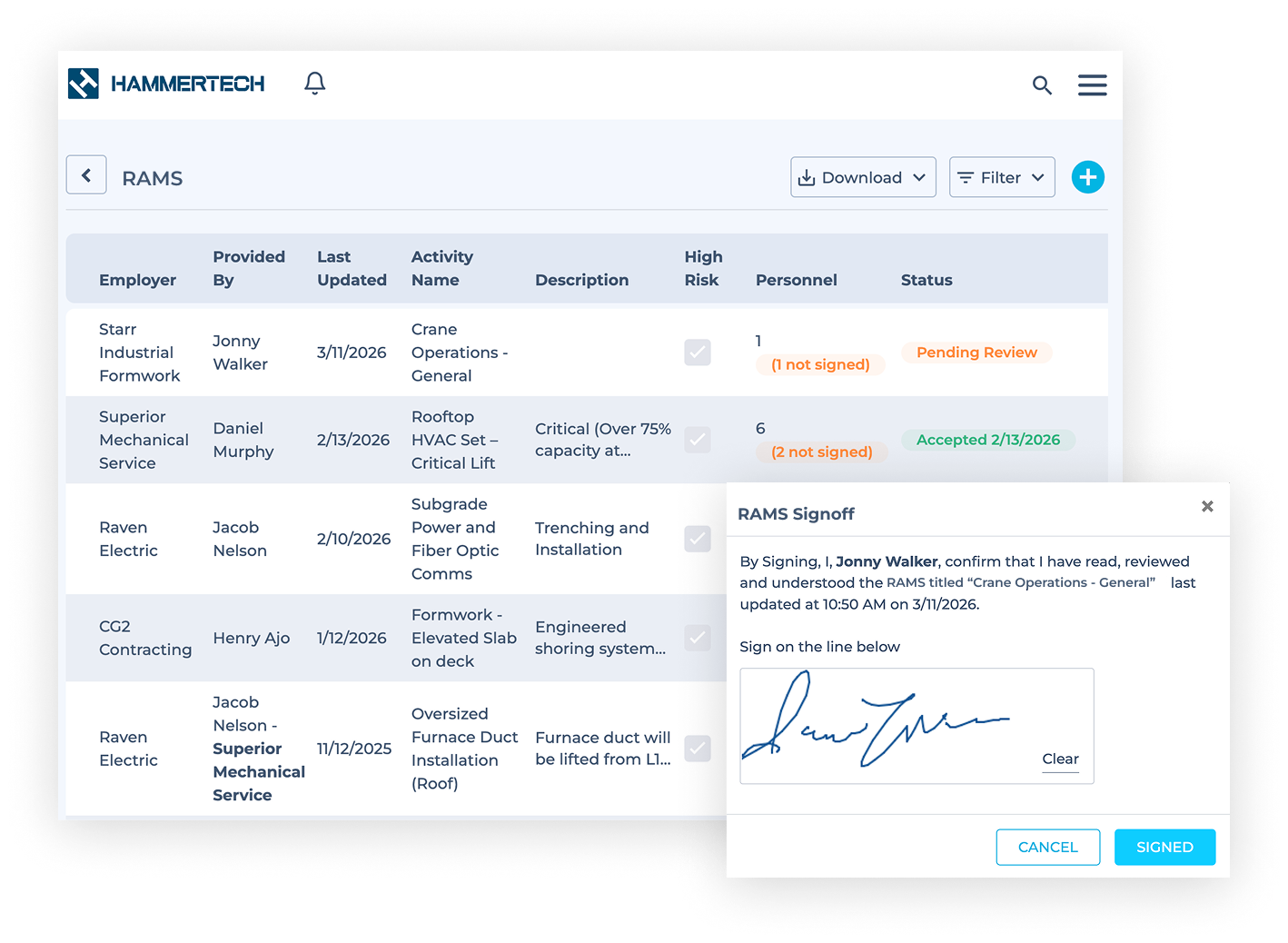
    Image of overlapping HammerTech dashboards showing RAMS management example, and
    Shows a HammerTech dashboard with a list of Risk assessment and method statements in various stages: Pending, Approved, etc., and sign-off.

    Track RAMS status and approval 

    Monitor review progress and approvals with clear status visibility.

    • Status Tracking – Configure status labels and quickly see the progress of each RAMS.

    • Approval Visibility – View who reviewed and approved each RAMS for full accountability.

    • Digital Signoff – Require reviewers to digitally sign RAMS before work begins.

    Customise RAMS forms and maintain version control

    Configure required fields and maintain consistent documentation across projects.

    • Standardized Forms – Customise RAMS templates to ensure consistent data across projects.

    • Custom Fields – Capture key details like specialty risks, assigned. personnel, and project requirements.

    • Version History – Track changes and maintain a record of previous RAMS versions.
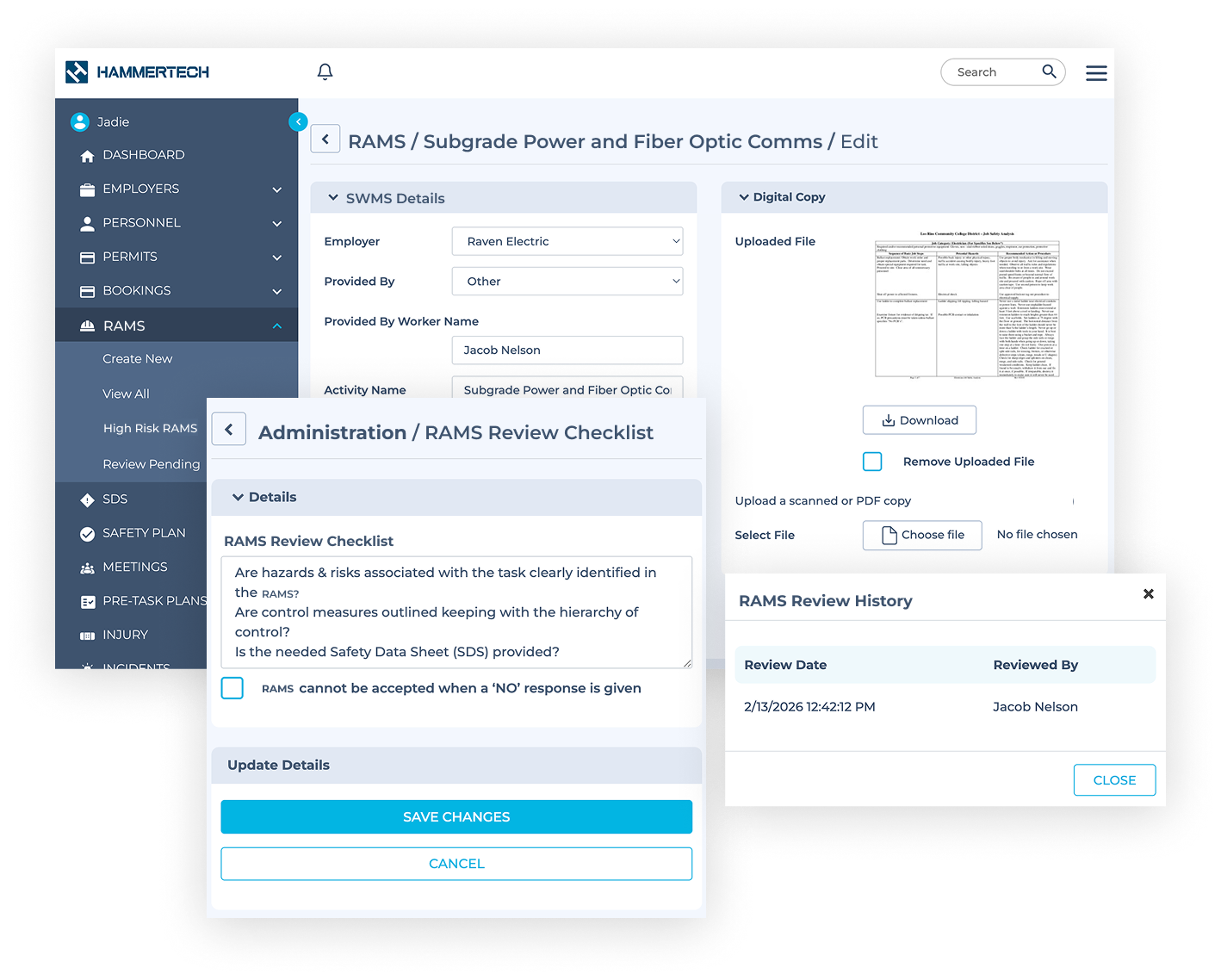
    Overlapping HammerTech dashboard images showing RAMS main page, RAMS review checklist, and RAMS review history for construction safety.

    Customer Quote

    "It’s great to be able to walk the site and instantly pull up relevant documentation - from RAMS and permits to worker competencies. Having everything in a central repository like HammerTech keeps our daily operations moving."

    Lucky Caswell
    Sr. Lead Construction Superintendent
    Suffolk Construction logo
    Capterra logo and 4.3 star rating for HammerTech's construction safety intelligence software platform.
    G2 logo and 5 star rating for HammerTech's construction safety intelligence software platform.
    Gartner logo and 4 star rating for HammerTech's construction safety intelligence software platform.
    GetApp logo and 4.5 star rating for HammerTech's construction safety intelligence software platform.
    Software Advice logo and 4.3 star rating for HammerTech's construction safety intelligence software platform.

    RAMS FAQs

    Can you assign specific individuals as RAMS reviewers?


    Yes. You can assign specific individuals to review a RAMS, and they will receive a notification when a review task is assigned.

    Will I be notified when a RAMS review is complete?


    Yes. You can configure notifications so selected users receive email alerts for status updates, completed reviews, or pending tasks.

    Can I link a RAMS to other safety workflows?


    Yes. RAMS can be linked to other safety processes such as worker profiles, safety plans, SPAs, equipment, inspections, permits, and SDS records.

    How do I ensure RAMS are completed before high-risk work begins?


    HammerTech helps enforce RAMS completion by tracking submission and approval status, ensuring high-risk activities are reviewed and approved before work starts onsite.

    Can I standardise RAMS across multiple projects?


    Yes. You can create customisable RAMS templates with required fields to ensure consistent hazard identification and documentation across all projects.

    How do workers access RAMS in the field?


    Workers can easily access RAMS from mobile devices, allowing them to review hazards, controls, and requirements in real time before and during work onsite.

    See it in action

    Talk to our team about how HammerTech can streamline RAMS reviews, approvals, and tracking on your projects.